#include <juce_Slider.h>
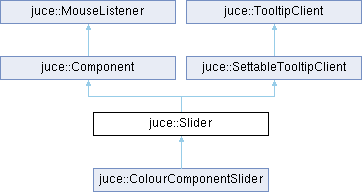
Classes | |
| struct | RotaryParameters |
| class | Listener |
| struct | SliderLayout |
| class | ScopedDragNotification |
| struct | LookAndFeelMethods |
| class | Pimpl |
Public Attributes | |
| std::function< void()> | onValueChange |
| std::function< void()> | onDragStart |
| std::function< void()> | onDragEnd |
| std::function< double(const String &)> | valueFromTextFunction |
| std::function< String(double)> | textFromValueFunction |
Private Member Functions | |
| std::unique_ptr< AccessibilityHandler > | createAccessibilityHandler () override |
| void | init (SliderStyle, TextEntryBoxPosition) |
Private Attributes | |
| std::unique_ptr< Pimpl > | pimpl |
Detailed Description
A slider control for changing a value.
The slider can be horizontal, vertical, or rotary, and can optionally have a text-box inside it to show an editable display of the current value.
To use it, create a Slider object and use the setSliderStyle() method to set up the type you want. To set up the text-entry box, use setTextBoxStyle().
To define the values that it can be set to, see the setRange() and setValue() methods.
There are also lots of custom tweaks you can do by subclassing and overriding some of the virtual methods, such as changing the scaling, changing the format of the text display, custom ways of limiting the values, etc.
You can register Slider::Listener objects with a slider, and they'll be called when the value changes.
- See also
- Slider::Listener
@tags{GUI}
Member Enumeration Documentation
◆ ColourIds
| enum juce::Slider::ColourIds |
A set of colour IDs to use to change the colour of various aspects of the slider.
These constants can be used either via the Component::setColour(), or LookAndFeel::setColour() methods.
- See also
- Component::setColour, Component::findColour, LookAndFeel::setColour, LookAndFeel::findColour
◆ DragMode
| enum juce::Slider::DragMode |
Describes the type of mouse-dragging that is happening when a value is being changed.
- See also
- snapValue
◆ IncDecButtonMode
| enum juce::Slider::IncDecButtonMode |
◆ SliderStyle
| enum juce::Slider::SliderStyle |
The types of slider available.
- See also
- setSliderStyle, setRotaryParameters
◆ TextEntryBoxPosition
| enum juce::Slider::TextEntryBoxPosition |
The position of the slider's text-entry box.
- See also
- setTextBoxStyle
Constructor & Destructor Documentation
◆ Slider() [1/3]
| juce::Slider::Slider | ( | ) |
Creates a slider. When created, you can set up the slider's style and range with setSliderStyle(), setRange(), etc.
◆ Slider() [2/3]
Creates a slider. When created, you can set up the slider's style and range with setSliderStyle(), setRange(), etc.
◆ Slider() [3/3]
| juce::Slider::Slider | ( | SliderStyle | style, |
| TextEntryBoxPosition | textBoxPosition ) |
Creates a slider with some explicit options.
◆ ~Slider()
|
override |
Destructor.
Member Function Documentation
◆ addListener()
Adds a listener to be called when this slider's value changes.
◆ colourChanged()
|
overridevirtual |
This method is called when a colour is changed by the setColour() method.
- See also
- setColour, findColour
Reimplemented from juce::Component.
◆ createAccessibilityHandler()
|
overrideprivatevirtual |
Override this method to return a custom AccessibilityHandler for this component.
The default implementation creates and returns a AccessibilityHandler object with an unspecified role, meaning that it will be visible to accessibility clients but without a specific role, action callbacks or interfaces. To control how accessibility clients see and interact with your component subclass AccessibilityHandler, implement the desired behaviours, and return an instance of it from this method in your component subclass.
The accessibility handler you return here is guaranteed to be destroyed before its Component, so it's safe to store and use a reference back to the Component inside the AccessibilityHandler if necessary.
- See also
- getAccessibilityHandler
Reimplemented from juce::Component.
◆ enablementChanged()
|
overridevirtual |
Callback to indicate that this component has been enabled or disabled.
This can be triggered by one of the component's parent components being enabled or disabled, as well as changes to the component itself.
The default implementation of this method does nothing; your class may wish to repaint itself or something when this happens.
- See also
- setEnabled, isEnabled
Reimplemented from juce::Component.
◆ focusOfChildComponentChanged()
|
overridevirtual |
Called to indicate a change in whether or not this component is the parent of the currently-focused component.
Essentially this is called when the return value of a call to hasKeyboardFocus (true) has changed. It happens when focus moves from one of this component's children (at any depth) to a component that isn't contained in this one, (or vice-versa). Note that this method does NOT get called to when focus simply moves from one of its child components to another.
- See also
- focusGained, setWantsKeyboardFocus, getCurrentlyFocusedComponent, hasKeyboardFocus
Reimplemented from juce::Component.
◆ getCurrentPopupDisplay()
|
noexcept |
If a popup display is enabled and is currently visible, this returns the component that is being shown, or nullptr if none is currently in use.
- See also
- setPopupDisplayEnabled
◆ getDoubleClickReturnValue()
|
noexcept |
Returns the values last set by setDoubleClickReturnValue() method.
- See also
- setDoubleClickReturnValue
◆ getInterval()
|
noexcept |
Returns the current step-size for values.
- See also
- setRange, getRange
◆ getMaximum()
|
noexcept |
Returns the current maximum value.
- See also
- setRange, getRange
◆ getMaxValue()
| double juce::Slider::getMaxValue | ( | ) | const |
For a slider with two or three thumbs, this returns the higher of its values.
For a two-value slider, the values are controlled with getMinValue() and getMaxValue(). A slider with three values also uses the normal getValue() and setValue() methods to control the middle value.
- See also
- getMinValue, TwoValueHorizontal, TwoValueVertical, ThreeValueHorizontal, ThreeValueVertical
◆ getMaxValueObject()
|
noexcept |
For a slider with two or three thumbs, this returns the higher of its values. You can use this Value object to connect the slider's position to external values or setters, either by taking a copy of the Value, or by using Value::referTo() to make it point to your own Value object.
- See also
- Value, getMaxValue, getMinValueObject
◆ getMinimum()
|
noexcept |
Returns the current minimum value.
- See also
- setRange, getRange
◆ getMinValue()
| double juce::Slider::getMinValue | ( | ) | const |
For a slider with two or three thumbs, this returns the lower of its values.
For a two-value slider, the values are controlled with getMinValue() and getMaxValue(). A slider with three values also uses the normal getValue() and setValue() methods to control the middle value.
- See also
- setMinValue, getMaxValue, TwoValueHorizontal, TwoValueVertical, ThreeValueHorizontal, ThreeValueVertical
◆ getMinValueObject()
|
noexcept |
For a slider with two or three thumbs, this returns the lower of its values. You can use this Value object to connect the slider's position to external values or setters, either by taking a copy of the Value, or by using Value::referTo() to make it point to your own Value object.
- See also
- Value, getMinValue, getMaxValueObject
◆ getMouseDragSensitivity()
|
noexcept |
Returns the current sensitivity value set by setMouseDragSensitivity().
◆ getNumDecimalPlacesToDisplay()
|
noexcept |
Returns the best number of decimal places to use when displaying this slider's value. It calculates the fewest decimal places needed to represent numbers with the slider's interval setting.
- See also
- setNumDecimalPlacesToDisplay
◆ getPositionOfValue()
| float juce::Slider::getPositionOfValue | ( | double | value | ) | const |
Returns the X or Y coordinate of a value along the slider's length.
If the slider is horizontal, this will be the X coordinate of the given value, relative to the left of the slider. If it's vertical, then this will be the Y coordinate, relative to the top of the slider.
If the slider is rotary, this will throw an assertion and return 0. If the value is out-of-range, it will be constrained to the length of the slider.
◆ getRange()
|
noexcept |
Returns the slider's range.
◆ getRotaryParameters()
|
noexcept |
Changes the properties of a rotary slider.
◆ getSkewFactor()
|
noexcept |
Returns the current skew factor. See setSkewFactor for more info.
- See also
- setSkewFactor, setSkewFactorFromMidPoint, isSymmetricSkew
◆ getSliderSnapsToMousePosition()
|
noexcept |
Returns true if setSliderSnapsToMousePosition() has been enabled.
◆ getSliderStyle()
|
noexcept |
Returns the slider's current style.
- See also
- setSliderStyle
◆ getTextBoxHeight()
|
noexcept |
Returns the height used for the text-box.
- See also
- setTextBoxStyle
◆ getTextBoxPosition()
|
noexcept |
Returns the status of the text-box.
- See also
- setTextBoxStyle
◆ getTextBoxWidth()
|
noexcept |
Returns the width used for the text-box.
- See also
- setTextBoxStyle
◆ getTextFromValue()
|
virtual |
Turns the slider's current value into a text string.
Subclasses can override this to customise the formatting of the text-entry box.
The default implementation just turns the value into a string, using a number of decimal places based on the range interval. If a suffix string has been set using setTextValueSuffix(), this will be appended to the text.
- See also
- getValueFromText
Reimplemented in juce::ColourComponentSlider.
◆ getTextValueSuffix()
| String juce::Slider::getTextValueSuffix | ( | ) | const |
Returns the suffix that was set by setTextValueSuffix().
◆ getThumbBeingDragged()
|
noexcept |
Returns a number to indicate which thumb is currently being dragged by the mouse.
This will return 0 for the main thumb, 1 for the minimum-value thumb, 2 for the maximum-value thumb, or -1 if none is currently down.
◆ getValue()
| double juce::Slider::getValue | ( | ) | const |
Returns the slider's current value.
◆ getValueFromText()
Subclasses can override this to convert a text string to a value.
When the user enters something into the text-entry box, this method is called to convert it to a value. The default implementation just tries to convert it to a double.
- See also
- getTextFromValue
Reimplemented in juce::ColourComponentSlider.
◆ getValueObject()
|
noexcept |
Returns the Value object that represents the slider's current position. You can use this Value object to connect the slider's position to external values or setters, either by taking a copy of the Value, or by using Value::referTo() to make it point to your own Value object.
- See also
- Value, getMaxValue, getMinValueObject
◆ getVelocityBasedMode()
|
noexcept |
Returns true if velocity-based mode is active.
- See also
- setVelocityBasedMode
◆ getVelocityModeIsSwappable()
|
noexcept |
Returns the velocity user key setting.
- See also
- setVelocityModeParameters
◆ getVelocityOffset()
|
noexcept |
Returns the velocity offset setting.
- See also
- setVelocityModeParameters
◆ getVelocitySensitivity()
|
noexcept |
Returns the velocity sensitivity setting.
- See also
- setVelocityModeParameters
◆ getVelocityThreshold()
|
noexcept |
Returns the velocity threshold setting.
- See also
- setVelocityModeParameters
◆ hideTextBox()
| void juce::Slider::hideTextBox | ( | bool | discardCurrentEditorContents | ) |
If the text-box currently has focus and is being edited, this resets it and takes keyboard focus away from it.
- Parameters
-
discardCurrentEditorContents if true, the slider's value will be left unchanged; if false, the current contents of the text editor will be used to set the slider position before it is hidden.
◆ init()
|
private |
◆ isBar()
|
noexcept |
True if the slider is in a linear bar mode.
◆ isDoubleClickReturnEnabled()
|
noexcept |
Returns true if double-clicking to reset to a default value is enabled.
- See also
- setDoubleClickReturnValue
◆ isHorizontal()
|
noexcept |
True if the slider moves horizontally.
◆ isRotary()
|
noexcept |
True if the slider is in a rotary mode.
◆ isScrollWheelEnabled()
|
noexcept |
Returns true if the scroll wheel can move the slider.
◆ isSymmetricSkew()
|
noexcept |
Returns the whether the skew is symmetric from the midpoint to both sides. See setSkewFactor for more info.
- See also
- getSkewFactor, setSkewFactor, setSkewFactorFromMidPoint
◆ isTextBoxEditable()
|
noexcept |
Returns true if the text-box is read-only.
- See also
- setTextBoxStyle
◆ isThreeValue()
|
noexcept |
True if the slider has three thumbs.
◆ isTwoValue()
|
noexcept |
True if the slider has two thumbs.
◆ isVertical()
|
noexcept |
True if the slider moves vertically.
◆ keyPressed()
Called when a key is pressed.
When a key is pressed, the component that has the keyboard focus will have this method called. Remember that a component will only be given the focus if its setWantsKeyboardFocus() method has been used to enable this.
If your implementation returns true, the event will be consumed and not passed on to any other listeners. If it returns false, the key will be passed to any KeyListeners that have been registered with this component. As soon as one of these returns true, the process will stop, but if they all return false, the event will be passed upwards to this component's parent, and so on.
The default implementation of this method does nothing and returns false.
- See also
- keyStateChanged, getCurrentlyFocusedComponent, addKeyListener
Reimplemented from juce::Component.
◆ lookAndFeelChanged()
|
overridevirtual |
Called to let the component react to a change in the look-and-feel setting.
When the look-and-feel is changed for a component, this will be called in all its child components, recursively.
It can also be triggered manually by the sendLookAndFeelChange() method, in case an application uses a LookAndFeel class that might have changed internally.
- See also
- sendLookAndFeelChange, getLookAndFeel
Reimplemented from juce::Component.
◆ modifierKeysChanged()
|
overridevirtual |
Called when a modifier key is pressed or released.
Whenever the shift, control, alt or command keys are pressed or released, this method will be called.
The component that is currently under the main mouse pointer will be tried first and, if there is no component currently under the pointer, the component that currently has the keyboard focus will have this method called. Remember that a component will only be given the focus if its setWantsKeyboardFocus() method has been used to enable this.
The default implementation of this method actually calls its parent's modifierKeysChanged method, so that focused components which aren't interested in this will give their parents a chance to act on the event instead.
- See also
- keyStateChanged, ModifierKeys
Reimplemented from juce::Component.
◆ mouseDoubleClick()
|
overridevirtual |
Called when a mouse button has been double-clicked on a component.
The MouseEvent object passed in contains lots of methods for finding out which button was pressed, as well as which modifier keys (e.g. shift, ctrl) were held down at the time.
- Parameters
-
Event details about the position and status of the mouse event, including the source component in which it occurred
- See also
- mouseDown, mouseUp
Reimplemented from juce::Component.
◆ mouseDown()
|
overridevirtual |
Called when a mouse button is pressed.
The MouseEvent object passed in contains lots of methods for finding out which button was pressed, as well as which modifier keys (e.g. shift, ctrl) were held down at the time.
Once a button is held down, the mouseDrag method will be called when the mouse moves, until the button is released.
- Parameters
-
Event details about the position and status of the mouse event, including the source component in which it occurred
- See also
- mouseUp, mouseDrag, mouseDoubleClick, contains
Reimplemented from juce::Component.
◆ mouseDrag()
|
overridevirtual |
Called when the mouse is moved while a button is held down.
When a mouse button is pressed inside a component, that component receives mouseDrag callbacks each time the mouse moves, even if the mouse strays outside the component's bounds.
- Parameters
-
Event details about the position and status of the mouse event, including the source component in which it occurred
- See also
- mouseDown, mouseUp, mouseMove, contains, setDragRepeatInterval
Reimplemented from juce::Component.
◆ mouseEnter()
|
overridevirtual |
Called when the mouse first enters a component.
If the mouse button isn't pressed and the mouse moves into a component, this will be called to let the component react to this.
When the mouse button is pressed and held down while being moved in or out of a component, no mouseEnter or mouseExit callbacks are made - only mouseDrag messages are sent to the component that the mouse was originally clicked on, until the button is released.
- Parameters
-
Event details about the position and status of the mouse event, including the source component in which it occurred
- See also
- mouseExit, mouseDrag, mouseMove, contains
Reimplemented from juce::Component.
◆ mouseExit()
|
overridevirtual |
Called when the mouse moves out of a component.
This will be called when the mouse moves off the edge of this component.
If the mouse button was pressed, and it was then dragged off the edge of the component and released, then this callback will happen when the button is released, after the mouseUp callback.
- Parameters
-
Event details about the position and status of the mouse event, including the source component in which it occurred
- See also
- mouseEnter, mouseDrag, mouseMove, contains
Reimplemented from juce::Component.
◆ mouseMove()
|
overridevirtual |
Called when the mouse moves inside a component.
If the mouse button isn't pressed and the mouse moves over a component, this will be called to let the component react to this.
A component will always get a mouseEnter callback before a mouseMove.
- Parameters
-
Event details about the position and status of the mouse event, including the source component in which it occurred
- See also
- mouseEnter, mouseExit, mouseDrag, contains
Reimplemented from juce::Component.
◆ mouseUp()
|
overridevirtual |
Called when a mouse button is released.
A mouseUp callback is sent to the component in which a button was pressed even if the mouse is actually over a different component when the button is released.
The MouseEvent object passed in contains lots of methods for finding out which buttons were down just before they were released.
- Parameters
-
Event details about the position and status of the mouse event, including the source component in which it occurred
- See also
- mouseDown, mouseDrag, mouseDoubleClick, contains
Reimplemented from juce::Component.
◆ mouseWheelMove()
|
overridevirtual |
Called when the mouse-wheel is moved.
This callback is sent to the component that the mouse is over when the wheel is moved.
If not overridden, a component will forward this message to its parent, so that parent components can collect mouse-wheel messages that happen to child components which aren't interested in them. (Bear in mind that if you attach a component as a mouse-listener to other components, then those wheel moves will also end up calling this method and being passed up to the parents, which may not be what you intended to happen).
- Parameters
-
Event details about the mouse event wheel details about the mouse wheel movement
Reimplemented from juce::Component.
◆ paint()
Components can override this method to draw their content.
The paint() method gets called when a region of a component needs redrawing, either because the component's repaint() method has been called, or because something has happened on the screen that means a section of a window needs to be redrawn.
Any child components will draw themselves over whatever this method draws. If you need to paint over the top of your child components, you can also implement the paintOverChildren() method to do this.
If you want to cause a component to redraw itself, this is done asynchronously - calling the repaint() method marks a region of the component as "dirty", and the paint() method will automatically be called sometime later, by the message thread, to paint any bits that need refreshing. In JUCE (and almost all modern UI frameworks), you never redraw something synchronously.
You should never need to call this method directly - to take a snapshot of the component you could use createComponentSnapshot() or paintEntireComponent().
- Parameters
-
g the graphics context that must be used to do the drawing operations.
- See also
- repaint, paintOverChildren, Graphics
Reimplemented from juce::Component.
◆ proportionOfLengthToValue()
|
virtual |
Allows a user-defined mapping of distance along the slider to its value.
The default implementation for this performs the skewing operation that can be set up in the setSkewFactor() method. Override it if you need some kind of custom mapping instead, but make sure you also implement the inverse function in valueToProportionOfLength().
- Parameters
-
proportion a value 0 to 1.0, indicating a distance along the slider
- Returns
- the slider value that is represented by this position
- See also
- valueToProportionOfLength
◆ removeListener()
◆ resized()
|
overridevirtual |
Called when this component's size has been changed.
A component can implement this method to do things such as laying out its child components when its width or height changes.
The method is called synchronously as a result of the setBounds or setSize methods, so repeatedly changing a components size will repeatedly call its resized method (unlike things like repainting, where multiple calls to repaint are coalesced together).
If the component is a top-level window on the desktop, its size could also be changed by operating-system factors beyond the application's control.
- See also
- moved, setSize
Reimplemented from juce::Component.
◆ setChangeNotificationOnlyOnRelease()
| void juce::Slider::setChangeNotificationOnlyOnRelease | ( | bool | onlyNotifyOnRelease | ) |
Tells the slider whether to keep sending change messages while the user is dragging the slider.
If set to true, a change message will only be sent when the user has dragged the slider and let go. If set to false (the default), then messages will be continuously sent as they drag it while the mouse button is still held down.
◆ setDoubleClickReturnValue()
| void juce::Slider::setDoubleClickReturnValue | ( | bool | shouldDoubleClickBeEnabled, |
| double | valueToSetOnDoubleClick, | ||
| ModifierKeys | singleClickModifiers = ModifierKeys::altModifier ) |
This lets you choose whether double-clicking or single-clicking with a specified key modifier moves the slider to a given position.
By default this is turned off, but it's handy if you want either of these actions to act as a quick way of resetting a slider. Just pass in the value you want it to go to when double-clicked. By default the key modifier is the alt key but you can pass in another key modifier, or none to disable this behaviour.
- See also
- getDoubleClickReturnValue
◆ setIncDecButtonsMode()
| void juce::Slider::setIncDecButtonsMode | ( | IncDecButtonMode | mode | ) |
When the style is IncDecButtons, this lets you turn on a mode where the mouse can be dragged on the buttons to drag the values.
By default this is turned off. When enabled, clicking on the buttons still works them as normal, but by holding down the mouse on a button and dragging it a little distance, it flips into a mode where the value can be dragged. The drag direction can either be set explicitly to be vertical or horizontal, or can be set to incDecButtonsDraggable_AutoDirection so that it depends on whether the buttons are side-by-side or above each other.
◆ setMaxValue() [1/4]
| void juce::Slider::setMaxValue | ( | double | newValue, |
| NotificationType | notification = sendNotificationAsync, | ||
| bool | allowNudgingOfOtherValues = false ) |
For a slider with two or three thumbs, this sets the lower of its values.
This will trigger a callback to Slider::Listener::sliderValueChanged() for any listeners that are registered, and will synchronously call the valueChanged() method in case subclasses want to handle it.
- Parameters
-
newValue the new value to set - this will be restricted by the minimum and maximum range, and will be snapped to the nearest interval if one has been set. notification can be one of the NotificationType values, to request a synchronous or asynchronous call to the valueChanged() method of any Slider::Listeners that are registered. A notification will only be sent if this value has changed. allowNudgingOfOtherValues if false, this value will be restricted to being above the min value (in a two-value slider) or the mid value (in a three-value slider). If true, then if this value goes beyond those values, it will push them along with it.
- See also
- getMaxValue, setMinValue, setValue
◆ setMaxValue() [2/4]
| void juce::Slider::setMaxValue | ( | double | , |
| bool | ) |
◆ setMaxValue() [3/4]
| void juce::Slider::setMaxValue | ( | double | , |
| bool | , | ||
| bool | ) |
◆ setMaxValue() [4/4]
| void juce::Slider::setMaxValue | ( | double | , |
| bool | , | ||
| bool | , | ||
| bool | ) |
◆ setMinAndMaxValues() [1/3]
| void juce::Slider::setMinAndMaxValues | ( | double | newMinValue, |
| double | newMaxValue, | ||
| NotificationType | notification = sendNotificationAsync ) |
For a slider with two or three thumbs, this sets the minimum and maximum thumb positions.
This will trigger a callback to Slider::Listener::sliderValueChanged() for any listeners that are registered, and will synchronously call the valueChanged() method in case subclasses want to handle it.
- Parameters
-
newMinValue the new minimum value to set - this will be snapped to the nearest interval if one has been set. newMaxValue the new minimum value to set - this will be snapped to the nearest interval if one has been set. notification can be one of the NotificationType values, to request a synchronous or asynchronous call to the valueChanged() method of any Slider::Listeners that are registered. A notification will only be sent if one or more of the values has changed.
- See also
- setMaxValue, setMinValue, setValue
◆ setMinAndMaxValues() [2/3]
| void juce::Slider::setMinAndMaxValues | ( | double | , |
| double | , | ||
| bool | ) |
◆ setMinAndMaxValues() [3/3]
| void juce::Slider::setMinAndMaxValues | ( | double | , |
| double | , | ||
| bool | , | ||
| bool | ) |
◆ setMinValue() [1/4]
| void juce::Slider::setMinValue | ( | double | newValue, |
| NotificationType | notification = sendNotificationAsync, | ||
| bool | allowNudgingOfOtherValues = false ) |
For a slider with two or three thumbs, this sets the lower of its values.
This will trigger a callback to Slider::Listener::sliderValueChanged() for any listeners that are registered, and will synchronously call the valueChanged() method in case subclasses want to handle it.
- Parameters
-
newValue the new value to set - this will be restricted by the minimum and maximum range, and will be snapped to the nearest interval if one has been set. notification can be one of the NotificationType values, to request a synchronous or asynchronous call to the valueChanged() method of any Slider::Listeners that are registered. A notification will only be sent if this value has changed. allowNudgingOfOtherValues if false, this value will be restricted to being below the max value (in a two-value slider) or the mid value (in a three-value slider). If true, then if this value goes beyond those values, it will push them along with it.
- See also
- getMinValue, setMaxValue, setValue
◆ setMinValue() [2/4]
| void juce::Slider::setMinValue | ( | double | , |
| bool | ) |
◆ setMinValue() [3/4]
| void juce::Slider::setMinValue | ( | double | , |
| bool | , | ||
| bool | ) |
◆ setMinValue() [4/4]
| void juce::Slider::setMinValue | ( | double | , |
| bool | , | ||
| bool | , | ||
| bool | ) |
◆ setMouseDragSensitivity()
Sets the distance the mouse has to move to drag the slider across the full extent of its range.
This only applies when in modes like RotaryHorizontalDrag, where it's using relative mouse movements to adjust the slider.
◆ setNormalisableRange()
| void juce::Slider::setNormalisableRange | ( | NormalisableRange< double > | newNormalisableRange | ) |
Sets a NormalisableRange to use for the Slider values.
- Parameters
-
newNormalisableRange the NormalisableRange to use
◆ setNumDecimalPlacesToDisplay()
Modifies the best number of decimal places to use when displaying this slider's value.
- See also
- getNumDecimalPlacesToDisplay
◆ setPopupDisplayEnabled()
| void juce::Slider::setPopupDisplayEnabled | ( | bool | shouldShowOnMouseDrag, |
| bool | shouldShowOnMouseHover, | ||
| Component * | parentComponentToUse, | ||
| int | hoverTimeout = 2000 ) |
If enabled, this gives the slider a pop-up bubble which appears while the slider is being dragged or hovered-over.
This can be handy if your slider doesn't have a text-box, so that users can see the value just when they're changing it.
If you pass a component as the parentComponentToUse parameter, the pop-up bubble will be added as a child of that component when it's needed. If you pass nullptr, the pop-up will be placed on the desktop instead (note that it's a transparent window, so if you're using an OS that can't do transparent windows you'll have to add it to a parent component instead).
By default the popup display shown when hovering will remain visible for 2 seconds, but it is possible to change this by passing a different hoverTimeout value. A value of -1 will cause the popup to remain until a mouseExit() occurs on the slider.
◆ setPopupMenuEnabled()
| void juce::Slider::setPopupMenuEnabled | ( | bool | menuEnabled | ) |
If this is set to true, then right-clicking on the slider will pop-up a menu to let the user change the way it works.
By default this is turned off, but when turned on, the menu will include things like velocity sensitivity, and for rotary sliders, whether they use a linear or rotary mouse-drag to move them.
◆ setRange() [1/2]
| void juce::Slider::setRange | ( | double | newMinimum, |
| double | newMaximum, | ||
| double | newInterval = 0 ) |
Sets the limits that the slider's value can take.
- Parameters
-
newMinimum the lowest value allowed newMaximum the highest value allowed newInterval the steps in which the value is allowed to increase - if this is not zero, the value will always be (newMinimum + (newInterval * an integer)).
◆ setRange() [2/2]
Sets the limits that the slider's value can take.
- Parameters
-
newRange the range to allow newInterval the steps in which the value is allowed to increase - if this is not zero, the value will always be (newMinimum + (newInterval * an integer)).
◆ setRotaryParameters() [1/2]
|
noexcept |
Changes the properties of a rotary slider.
◆ setRotaryParameters() [2/2]
|
noexcept |
Changes the properties of a rotary slider.
◆ setScrollWheelEnabled()
| void juce::Slider::setScrollWheelEnabled | ( | bool | enabled | ) |
This can be used to stop the mouse scroll-wheel from moving the slider. By default it's enabled.
◆ setSkewFactor()
Sets up a skew factor to alter the way values are distributed.
You may want to use a range of values on the slider where more accuracy is required towards one end of the range, so this will logarithmically spread the values across the length of the slider.
If the factor is < 1.0, the lower end of the range will fill more of the slider's length; if the factor is > 1.0, the upper end of the range will be expanded instead. A factor of 1.0 doesn't skew it at all.
If symmetricSkew is true, the skew factor applies from the middle of the slider to each of its ends.
To set the skew position by using a mid-point, use the setSkewFactorFromMidPoint() method instead.
- See also
- getSkewFactor, setSkewFactorFromMidPoint, isSymmetricSkew
◆ setSkewFactorFromMidPoint()
| void juce::Slider::setSkewFactorFromMidPoint | ( | double | sliderValueToShowAtMidPoint | ) |
Sets up a skew factor to alter the way values are distributed.
This allows you to specify the slider value that should appear in the centre of the slider's visible range.
- See also
- setSkewFactor, getSkewFactor, isSymmetricSkew
◆ setSliderSnapsToMousePosition()
| void juce::Slider::setSliderSnapsToMousePosition | ( | bool | shouldSnapToMouse | ) |
This lets you change whether the slider thumb jumps to the mouse position when you click.
By default, this is true. If it's false, then the slider moves with relative motion when you drag it.
This only applies to linear bars, and won't affect two- or three- value sliders.
◆ setSliderStyle()
| void juce::Slider::setSliderStyle | ( | SliderStyle | newStyle | ) |
Changes the type of slider interface being used.
- Parameters
-
newStyle the type of interface
- See also
- setRotaryParameters, setVelocityBasedMode
◆ setTextBoxIsEditable()
| void juce::Slider::setTextBoxIsEditable | ( | bool | shouldBeEditable | ) |
Makes the text-box editable.
By default this is true, and the user can enter values into the textbox, but it can be turned off if that's not suitable.
- See also
- setTextBoxStyle, getValueFromText, getTextFromValue
◆ setTextBoxStyle()
| void juce::Slider::setTextBoxStyle | ( | TextEntryBoxPosition | newPosition, |
| bool | isReadOnly, | ||
| int | textEntryBoxWidth, | ||
| int | textEntryBoxHeight ) |
Changes the location and properties of the text-entry box.
- Parameters
-
newPosition where it should go (or NoTextBox to not have one at all) isReadOnly if true, it's a read-only display textEntryBoxWidth the width of the text-box in pixels. Make sure this leaves enough room for the slider as well! textEntryBoxHeight the height of the text-box in pixels. Make sure this leaves enough room for the slider as well!
- See also
- setTextBoxIsEditable, getValueFromText, getTextFromValue
◆ setTextValueSuffix()
Sets a suffix to append to the end of the numeric value when it's displayed as a string.
This is used by the default implementation of getTextFromValue(), and is just appended to the numeric value. For more advanced formatting, you can override getTextFromValue() and do something else.
◆ setValue() [1/3]
| void juce::Slider::setValue | ( | double | newValue, |
| NotificationType | notification = sendNotificationAsync ) |
Changes the slider's current value.
This will trigger a callback to Slider::Listener::sliderValueChanged() for any listeners that are registered, and will synchronously call the valueChanged() method in case subclasses want to handle it.
- Parameters
-
newValue the new value to set - this will be restricted by the minimum and maximum range, and will be snapped to the nearest interval if one has been set notification can be one of the NotificationType values, to request a synchronous or asynchronous call to the valueChanged() method of any Slider::Listeners that are registered. A notification will only be sent if the Slider's value has changed.
◆ setValue() [2/3]
| void juce::Slider::setValue | ( | double | , |
| bool | ) |
◆ setValue() [3/3]
| void juce::Slider::setValue | ( | double | , |
| bool | , | ||
| bool | ) |
◆ setVelocityBasedMode()
| void juce::Slider::setVelocityBasedMode | ( | bool | isVelocityBased | ) |
Changes the way the mouse is used when dragging the slider.
If true, this will turn on velocity-sensitive dragging, so that the faster the mouse moves, the bigger the movement to the slider. This helps when making accurate adjustments if the slider's range is quite large.
If false, the slider will just try to snap to wherever the mouse is.
◆ setVelocityModeParameters()
| void juce::Slider::setVelocityModeParameters | ( | double | sensitivity = 1.0, |
| int | threshold = 1, | ||
| double | offset = 0.0, | ||
| bool | userCanPressKeyToSwapMode = true, | ||
| ModifierKeys::Flags | modifiersToSwapModes = ModifierKeys::ctrlAltCommandModifiers ) |
Changes aspects of the scaling used when in velocity-sensitive mode.
These apply when you've used setVelocityBasedMode() to turn on velocity mode, or if you're holding down ctrl.
- Parameters
-
sensitivity higher values than 1.0 increase the range of acceleration used threshold the minimum number of pixels that the mouse needs to move for it to be treated as a movement offset values greater than 0.0 increase the minimum speed that will be used when the threshold is reached userCanPressKeyToSwapMode if true, then the user can hold down the ctrl or command key to toggle velocity-sensitive mode modifiersToSwapModes this is a set of modifier flags which will be tested when determining whether to enable/disable velocity-sensitive mode
◆ showTextBox()
| void juce::Slider::showTextBox | ( | ) |
If the text-box is editable, this will give it the focus so that the user can type directly into it. This is basically the effect as the user clicking on it.
◆ snapValue()
|
virtual |
This can be overridden to allow the slider to snap to user-definable values.
If overridden, it will be called when the user tries to move the slider to a given position, and allows a subclass to sanity-check this value, possibly returning a different value to use instead.
- Parameters
-
attemptedValue the value the user is trying to enter dragMode indicates whether the user is dragging with the mouse; notDragging if they are entering the value using the text box or other non-dragging interaction
- Returns
- the value to use instead
◆ startedDragging()
|
virtual |
Callback to indicate that the user is about to start dragging the slider.
- See also
- Slider::Listener::sliderDragStarted
◆ stoppedDragging()
|
virtual |
Callback to indicate that the user has just stopped dragging the slider.
- See also
- Slider::Listener::sliderDragEnded
◆ updateText()
| void juce::Slider::updateText | ( | ) |
This can be called to force the text box to update its contents. (Not normally needed, as this is done automatically).
◆ valueChanged()
|
virtual |
Callback to indicate that the user has just moved the slider.
- See also
- Slider::Listener::sliderValueChanged
◆ valueToProportionOfLength()
|
virtual |
Allows a user-defined mapping of value to the position of the slider along its length.
The default implementation for this performs the skewing operation that can be set up in the setSkewFactor() method. Override it if you need some kind of custom mapping instead, but make sure you also implement the inverse function in proportionOfLengthToValue().
- Parameters
-
value a valid slider value, between the range of values specified in setRange()
- Returns
- a value 0 to 1.0 indicating the distance along the slider that represents this value
- See also
- proportionOfLengthToValue
Member Data Documentation
◆ onDragEnd
| std::function<void()> juce::Slider::onDragEnd |
You can assign a lambda to this callback object to have it called when the slider's drag ends.
◆ onDragStart
| std::function<void()> juce::Slider::onDragStart |
You can assign a lambda to this callback object to have it called when the slider's drag begins.
◆ onValueChange
| std::function<void()> juce::Slider::onValueChange |
You can assign a lambda to this callback object to have it called when the slider value is changed.
◆ pimpl
|
private |
◆ textFromValueFunction
| std::function<String (double)> juce::Slider::textFromValueFunction |
You can assign a lambda that will be used to convert the slider's normalised position to a textual value.
◆ valueFromTextFunction
You can assign a lambda that will be used to convert textual values to the slider's normalised position.
The documentation for this class was generated from the following files:
- /home/runner/work/lmms-fork/lmms-fork/plugins/CarlaBase/carla/source/modules/juce_gui_basics/widgets/juce_Slider.h
- /home/runner/work/lmms-fork/lmms-fork/plugins/CarlaBase/carla/source/modules/juce_gui_basics/widgets/juce_Slider.cpp
Generated on for LMMS by
 1.16.1