#include <juce_Toolbar.h>
Classes | |
| struct | LookAndFeelMethods |
| class | Spacer |
| class | MissingItemsComponent |
| class | CustomisationDialog |
Public Types | |
| enum | ToolbarItemStyle { iconsOnly , iconsWithText , textOnly } |
| enum | CustomisationFlags { allowIconsOnlyChoice = 1 , allowIconsWithTextChoice = 2 , allowTextOnlyChoice = 4 , showResetToDefaultsButton = 8 , allCustomisationOptionsEnabled = (allowIconsOnlyChoice | allowIconsWithTextChoice | allowTextOnlyChoice | showResetToDefaultsButton) } |
| enum | ColourIds { backgroundColourId = 0x1003200 , separatorColourId = 0x1003210 , buttonMouseOverBackgroundColourId = 0x1003220 , buttonMouseDownBackgroundColourId = 0x1003230 , labelTextColourId = 0x1003240 , editingModeOutlineColourId = 0x1003250 } |
| Public Types inherited from juce::Component | |
| enum class | FocusContainerType { none , focusContainer , keyboardFocusContainer } |
| enum | FocusChangeType { focusChangedByMouseClick , focusChangedByTabKey , focusChangedDirectly } |
Static Public Attributes | |
| static const char *const | toolbarDragDescriptor = "_toolbarItem_" |
Private Member Functions | |
| std::unique_ptr< AccessibilityHandler > | createAccessibilityHandler () override |
| void | initMissingItemButton () |
| void | showMissingItems () |
| void | addItemInternal (ToolbarItemFactory &factory, int itemId, int insertIndex) |
| ToolbarItemComponent * | getNextActiveComponent (int index, int delta) const |
Private Attributes | |
| std::unique_ptr< Button > | missingItemsButton |
| bool | vertical = false |
| bool | isEditingActive = false |
| ToolbarItemStyle | toolbarStyle = iconsOnly |
| OwnedArray< ToolbarItemComponent > | items |
Friends | |
| class | MissingItemsComponent |
Additional Inherited Members | |
| Protected Member Functions inherited from juce::Component | |
| virtual ComponentPeer * | createNewPeer (int styleFlags, void *nativeWindowToAttachTo) |
| Protected Member Functions inherited from juce::DragAndDropContainer | |
| virtual bool | shouldDropFilesWhenDraggedExternally (const DragAndDropTarget::SourceDetails &sourceDetails, StringArray &files, bool &canMoveFiles) |
| virtual bool | shouldDropTextWhenDraggedExternally (const DragAndDropTarget::SourceDetails &sourceDetails, String &text) |
| virtual void | dragOperationStarted (const DragAndDropTarget::SourceDetails &) |
| virtual void | dragOperationEnded (const DragAndDropTarget::SourceDetails &) |
| Static Protected Member Functions inherited from juce::Component | |
| static std::unique_ptr< AccessibilityHandler > | createIgnoredAccessibilityHandler (Component &) |
Detailed Description
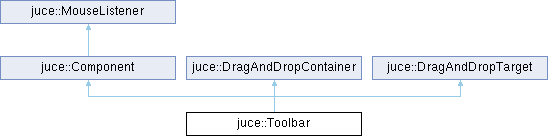
A toolbar component.
A toolbar contains a horizontal or vertical strip of ToolbarItemComponents, and looks after their order and layout.
Items (icon buttons or other custom components) are added to a toolbar using a ToolbarItemFactory - each type of item is given a unique ID number, and a toolbar might contain more than one instance of a particular item type.
Toolbars can be interactively customised, allowing the user to drag the items around, and to drag items onto or off the toolbar, using the ToolbarItemPalette component as a source of new items.
@tags{GUI}
Member Enumeration Documentation
◆ ColourIds
| enum juce::Toolbar::ColourIds |
A set of colour IDs to use to change the colour of various aspects of the toolbar.
These constants can be used either via the Component::setColour(), or LookAndFeel::setColour() methods.
- See also
- Component::setColour, Component::findColour, LookAndFeel::setColour, LookAndFeel::findColour
◆ CustomisationFlags
| enum juce::Toolbar::CustomisationFlags |
Flags used by the showCustomisationDialog() method.
◆ ToolbarItemStyle
| enum juce::Toolbar::ToolbarItemStyle |
Constructor & Destructor Documentation
◆ Toolbar()
| juce::Toolbar::Toolbar | ( | ) |
Creates an empty toolbar component.
To add some icons or other components to your toolbar, you'll need to create a ToolbarItemFactory class that can create a suitable set of ToolbarItemComponents.
- See also
- ToolbarItemFactory, ToolbarItemComponents
◆ ~Toolbar()
|
override |
Destructor.
Any items on the bar will be deleted when the toolbar is deleted.
Member Function Documentation
◆ addDefaultItems()
| void juce::Toolbar::addDefaultItems | ( | ToolbarItemFactory & | factoryToUse | ) |
Clears this toolbar and adds to it the default set of items that the specified factory creates.
- See also
- ToolbarItemFactory::getDefaultItemSet
◆ addItem()
| void juce::Toolbar::addItem | ( | ToolbarItemFactory & | factory, |
| int | itemId, | ||
| int | insertIndex = -1 ) |
Adds an item to the toolbar.
The factory's ToolbarItemFactory::createItem() will be called by this method to create the component that will actually be added to the bar.
The new item will be inserted at the specified index (if the index is -1, it will be added to the right-hand or bottom end of the bar).
Once added, the component will be automatically deleted by this object when it is no longer needed.
- See also
- ToolbarItemFactory
◆ addItemInternal()
|
private |
◆ clear()
| void juce::Toolbar::clear | ( | ) |
Deletes all items from the bar.
◆ createAccessibilityHandler()
|
overrideprivatevirtual |
Override this method to return a custom AccessibilityHandler for this component.
The default implementation creates and returns a AccessibilityHandler object with an unspecified role, meaning that it will be visible to accessibility clients but without a specific role, action callbacks or interfaces. To control how accessibility clients see and interact with your component subclass AccessibilityHandler, implement the desired behaviours, and return an instance of it from this method in your component subclass.
The accessibility handler you return here is guaranteed to be destroyed before its Component, so it's safe to store and use a reference back to the Component inside the AccessibilityHandler if necessary.
- See also
- getAccessibilityHandler
Reimplemented from juce::Component.
◆ createItem()
|
static |
◆ getItemComponent()
|
noexcept |
Returns the component being used for the item with the given index.
If the index is less than zero or greater than the number of items, this will return nullptr.
- See also
- getNumItems
◆ getItemId()
Returns the ID of the item with the given index.
If the index is less than zero or greater than the number of items, this will return nullptr.
- See also
- getNumItems
◆ getLength()
|
noexcept |
Returns the length of the bar.
If the bar is horizontal, this will return its width; if it's vertical, it will return its height.
- See also
- getThickness
◆ getNextActiveComponent()
|
private |
◆ getNumItems()
|
noexcept |
Returns the number of items currently on the toolbar.
- See also
- getItemId, getItemComponent
◆ getStyle()
|
inlinenoexcept |
Returns the toolbar's current style.
- See also
- ToolbarItemStyle, setStyle
◆ getThickness()
|
noexcept |
Returns the depth of the bar.
If the bar is horizontal, this will return its height; if it's vertical, it will return its width.
- See also
- getLength
◆ initMissingItemButton()
|
private |
◆ isInterestedInDragSource()
|
overridevirtual |
Callback to check whether this target is interested in the type of object being dragged.
- Parameters
-
dragSourceDetails contains information about the source of the drag operation.
- Returns
- true if this component wants to receive the other callbacks regarding this type of object; if it returns false, no other callbacks will be made.
Implements juce::DragAndDropTarget.
◆ isVertical()
|
inlinenoexcept |
Returns true if the bar is set to be vertical, or false if it's horizontal.
You can change the bar's orientation with setVertical().
◆ itemDragExit()
|
overridevirtual |
Callback to indicate that something has been dragged off the edge of this component.
This gets called when the user moves the mouse out of this component while dragging something.
If you've used itemDragEnter() to repaint your component and give feedback, use this as a signal to repaint it in its normal state.
- Parameters
-
dragSourceDetails contains information about the source of the drag operation.
- See also
- itemDragEnter
Reimplemented from juce::DragAndDropTarget.
◆ itemDragMove()
|
overridevirtual |
Callback to indicate that the user is dragging something over this component.
This gets called when the user moves the mouse over this component while dragging something. Normally overriding itemDragEnter() and itemDragExit() are enough, but this lets you know what happens in-between.
- Parameters
-
dragSourceDetails contains information about the source of the drag operation.
Reimplemented from juce::DragAndDropTarget.
◆ itemDropped()
|
overridevirtual |
Callback to indicate that the user has dropped something onto this component.
When the user drops an item this get called, and you can use the description to work out whether your object wants to deal with it or not.
Note that after this is called, the itemDragExit method may not be called, so you should clean up in here if there's anything you need to do when the drag finishes.
- Parameters
-
dragSourceDetails contains information about the source of the drag operation.
Implements juce::DragAndDropTarget.
◆ lookAndFeelChanged()
|
overridevirtual |
Called to let the component react to a change in the look-and-feel setting.
When the look-and-feel is changed for a component, this will be called in all its child components, recursively.
It can also be triggered manually by the sendLookAndFeelChange() method, in case an application uses a LookAndFeel class that might have changed internally.
- See also
- sendLookAndFeelChange, getLookAndFeel
Reimplemented from juce::Component.
◆ mouseDown()
|
overridevirtual |
Called when a mouse button is pressed.
The MouseEvent object passed in contains lots of methods for finding out which button was pressed, as well as which modifier keys (e.g. shift, ctrl) were held down at the time.
Once a button is held down, the mouseDrag method will be called when the mouse moves, until the button is released.
- Parameters
-
Event details about the position and status of the mouse event, including the source component in which it occurred
- See also
- mouseUp, mouseDrag, mouseDoubleClick, contains
Reimplemented from juce::Component.
◆ paint()
Components can override this method to draw their content.
The paint() method gets called when a region of a component needs redrawing, either because the component's repaint() method has been called, or because something has happened on the screen that means a section of a window needs to be redrawn.
Any child components will draw themselves over whatever this method draws. If you need to paint over the top of your child components, you can also implement the paintOverChildren() method to do this.
If you want to cause a component to redraw itself, this is done asynchronously - calling the repaint() method marks a region of the component as "dirty", and the paint() method will automatically be called sometime later, by the message thread, to paint any bits that need refreshing. In JUCE (and almost all modern UI frameworks), you never redraw something synchronously.
You should never need to call this method directly - to take a snapshot of the component you could use createComponentSnapshot() or paintEntireComponent().
- Parameters
-
g the graphics context that must be used to do the drawing operations.
- See also
- repaint, paintOverChildren, Graphics
Reimplemented from juce::Component.
◆ removeAndReturnItem()
| ToolbarItemComponent * juce::Toolbar::removeAndReturnItem | ( | int | itemIndex | ) |
Removes an item from the bar and returns it.
◆ removeToolbarItem()
◆ resized()
|
overridevirtual |
Called when this component's size has been changed.
A component can implement this method to do things such as laying out its child components when its width or height changes.
The method is called synchronously as a result of the setBounds or setSize methods, so repeatedly changing a components size will repeatedly call its resized method (unlike things like repainting, where multiple calls to repaint are coalesced together).
If the component is a top-level window on the desktop, its size could also be changed by operating-system factors beyond the application's control.
- See also
- moved, setSize
Reimplemented from juce::Component.
◆ restoreFromString()
| bool juce::Toolbar::restoreFromString | ( | ToolbarItemFactory & | factoryToUse, |
| const String & | savedVersion ) |
Restores a set of items that was previously stored in a string by the toString() method.
The factory object is used to create any item components that are needed.
- See also
- toString
◆ setEditingActive()
| void juce::Toolbar::setEditingActive | ( | bool | editingEnabled | ) |
Turns on or off the toolbar's editing mode, in which its items can be rearranged by the user.
(In most cases it's easier just to use showCustomisationDialog() instead of trying to enable editing directly).
- See also
- ToolbarItemPalette
◆ setStyle()
| void juce::Toolbar::setStyle | ( | const ToolbarItemStyle & | newStyle | ) |
Changes the toolbar's current style.
- See also
- ToolbarItemStyle, getStyle, ToolbarItemComponent::setStyle
◆ setVertical()
| void juce::Toolbar::setVertical | ( | bool | shouldBeVertical | ) |
Changes the bar's orientation.
- See also
- isVertical
◆ showCustomisationDialog()
| void juce::Toolbar::showCustomisationDialog | ( | ToolbarItemFactory & | factory, |
| int | optionFlags = allCustomisationOptionsEnabled ) |
Pops up a modal dialog box that allows this toolbar to be customised by the user.
The dialog contains a ToolbarItemPalette and various controls for editing other aspects of the toolbar. The dialog box will be opened modally, but the method will return immediately.
The factory is used to determine the set of items that will be shown on the palette.
The optionFlags parameter is a bitwise-or of values from the CustomisationFlags enum.
- See also
- ToolbarItemPalette
◆ showMissingItems()
|
private |
◆ toString()
| String juce::Toolbar::toString | ( | ) | const |
Returns a string that represents the toolbar's current set of items.
This lets you later restore the same item layout using restoreFromString().
- See also
- restoreFromString
◆ updateAllItemPositions()
| void juce::Toolbar::updateAllItemPositions | ( | bool | animate | ) |
Friends And Related Symbol Documentation
◆ MissingItemsComponent
|
friend |
Member Data Documentation
◆ isEditingActive
|
private |
◆ items
|
private |
◆ missingItemsButton
|
private |
◆ toolbarDragDescriptor
◆ toolbarStyle
|
private |
◆ vertical
|
private |
The documentation for this class was generated from the following files:
- /home/runner/work/lmms-fork/lmms-fork/plugins/CarlaBase/carla/source/modules/juce_gui_basics/widgets/juce_Toolbar.h
- /home/runner/work/lmms-fork/lmms-fork/plugins/CarlaBase/carla/source/modules/juce_gui_basics/widgets/juce_Toolbar.cpp
Generated on for LMMS by
 1.16.1