#include <juce_DialogWindow.h>
Classes | |
| struct | LaunchOptions |
Private Member Functions | |
| std::unique_ptr< AccessibilityHandler > | createAccessibilityHandler () override |
Private Attributes | |
| float | desktopScale = 1.0f |
| bool | escapeKeyTriggersCloseButton |
Additional Inherited Members | |
| Public Types inherited from juce::DocumentWindow | |
| enum | TitleBarButtons { minimiseButton = 1 , maximiseButton = 2 , closeButton = 4 , allButtons = 7 } |
| enum | ColourIds { textColourId = 0x1005701 } |
| Public Types inherited from juce::ResizableWindow | |
| enum | ColourIds { backgroundColourId = 0x1005700 } |
| Public Types inherited from juce::Component | |
| enum class | FocusContainerType { none , focusContainer , keyboardFocusContainer } |
| enum | FocusChangeType { focusChangedByMouseClick , focusChangedByTabKey , focusChangedDirectly } |
| Static Protected Member Functions inherited from juce::Component | |
| static std::unique_ptr< AccessibilityHandler > | createIgnoredAccessibilityHandler (Component &) |
| Protected Attributes inherited from juce::ResizableWindow | |
| std::unique_ptr< ResizableCornerComponent > | resizableCorner |
| std::unique_ptr< ResizableBorderComponent > | resizableBorder |
Detailed Description
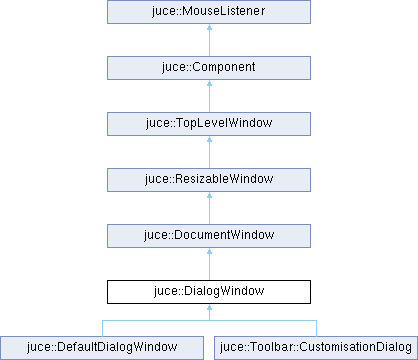
A dialog-box style window.
This class is a convenient way of creating a DocumentWindow with a close button that can be triggered by pressing the escape key.
Any of the methods available to a DocumentWindow or ResizableWindow are also available to this, so it can be made resizable, have a menu bar, etc.
You can either override or use an instance of the DialogWindow class directly, or you can use a DialogWindow::LaunchOptions structure to quickly set up and launch a box containing a content component.
If you use the class directly, you'll need to override the DocumentWindow::closeButtonPressed() method to handle the user clicking the close button - for more info, see the DocumentWindow help.
- See also
- DocumentWindow, ResizableWindow
@tags{GUI}
Constructor & Destructor Documentation
◆ DialogWindow()
| juce::DialogWindow::DialogWindow | ( | const String & | name, |
| Colour | backgroundColour, | ||
| bool | escapeKeyTriggersCloseButton, | ||
| bool | addToDesktop = true, | ||
| float | desktopScale = 1.0f ) |
Creates a DialogWindow.
- Parameters
-
name the name to give the component - this is also the title shown at the top of the window. To change this later, use setName() backgroundColour the colour to use for filling the window's background. escapeKeyTriggersCloseButton if true, then pressing the escape key will cause the close button to be triggered addToDesktop if true, the window will be automatically added to the desktop; if false, you can use it as a child component desktopScale specifies the scale to use when drawing the window. In a plugin, the host controls the scale used to render the plugin editor. You should query the editor scale with Component::getApproximateScaleFactorForComponent() and pass the result here. You can ignore this parameter in a standalone app
◆ ~DialogWindow()
|
overridedefault |
Destructor. If a content component has been set with setContentOwned(), it will be deleted.
Member Function Documentation
◆ createAccessibilityHandler()
|
overrideprivatevirtual |
Override this method to return a custom AccessibilityHandler for this component.
The default implementation creates and returns a AccessibilityHandler object with an unspecified role, meaning that it will be visible to accessibility clients but without a specific role, action callbacks or interfaces. To control how accessibility clients see and interact with your component subclass AccessibilityHandler, implement the desired behaviours, and return an instance of it from this method in your component subclass.
The accessibility handler you return here is guaranteed to be destroyed before its Component, so it's safe to store and use a reference back to the Component inside the AccessibilityHandler if necessary.
- See also
- getAccessibilityHandler
Reimplemented from juce::Component.
◆ escapeKeyPressed()
|
virtual |
Called when the escape key is pressed. This can be overridden to do things other than the default behaviour, which is to hide the window. Return true if the key has been used, or false if it was ignored.
◆ getDesktopScaleFactor()
|
inlineoverrideprotectedvirtual |
Returns the default scale factor to use for this component when it is placed on the desktop. The default implementation of this method just returns the value from Desktop::getGlobalScaleFactor(), but it can be overridden if a particular component has different requirements. The method only used if this component is added to the desktop - it has no effect for child components.
Reimplemented from juce::Component.
◆ keyPressed()
Called when a key is pressed.
When a key is pressed, the component that has the keyboard focus will have this method called. Remember that a component will only be given the focus if its setWantsKeyboardFocus() method has been used to enable this.
If your implementation returns true, the event will be consumed and not passed on to any other listeners. If it returns false, the key will be passed to any KeyListeners that have been registered with this component. As soon as one of these returns true, the process will stop, but if they all return false, the event will be passed upwards to this component's parent, and so on.
The default implementation of this method does nothing and returns false.
- See also
- keyStateChanged, getCurrentlyFocusedComponent, addKeyListener
Reimplemented from juce::Component.
◆ resized()
|
overrideprotectedvirtual |
Called when this component's size has been changed.
A component can implement this method to do things such as laying out its child components when its width or height changes.
The method is called synchronously as a result of the setBounds or setSize methods, so repeatedly changing a components size will repeatedly call its resized method (unlike things like repainting, where multiple calls to repaint are coalesced together).
If the component is a top-level window on the desktop, its size could also be changed by operating-system factors beyond the application's control.
- See also
- moved, setSize
Reimplemented from juce::Component.
◆ showDialog()
|
static |
Easy way of quickly showing a dialog box containing a given component.
Note: This method has been superseded by the DialogWindow::LaunchOptions structure, which does the same job with some extra flexibility. The showDialog method is here for backwards compatibility, but please use DialogWindow::LaunchOptions in new code.
This will open and display a DialogWindow containing a given component, making it modal, but returning immediately to allow the dialog to finish in its own time. If you want to block and run a modal loop until the dialog is dismissed, use showModalDialog() instead.
To close the dialog programmatically, you should call exitModalState (returnValue) on the DialogWindow that is created. To find a pointer to this window from your contentComponent, you can do something like this:
- Parameters
-
dialogTitle the dialog box's title contentComponent the content component for the dialog box. Make sure that this has been set to the size you want it to be before calling this method. The component won't be deleted by this call, so you can re-use it or delete it afterwards componentToCentreAround if this is not a nullptr, it indicates a component that you'd like to show this dialog box in front of. See the DocumentWindow::centreAroundComponent() method for more info on this parameter backgroundColour a colour to use for the dialog box's background colour escapeKeyTriggersCloseButton if true, then pressing the escape key will cause the close button to be triggered shouldBeResizable if true, the dialog window has either a resizable border, or a corner resizer useBottomRightCornerResizer if shouldBeResizable is true, this indicates whether to use a border or corner resizer component. See ResizableWindow::setResizable()
Member Data Documentation
◆ desktopScale
|
private |
◆ escapeKeyTriggersCloseButton
|
private |
The documentation for this class was generated from the following files:
- /home/runner/work/lmms-fork/lmms-fork/plugins/CarlaBase/carla/source/modules/juce_gui_basics/windows/juce_DialogWindow.h
- /home/runner/work/lmms-fork/lmms-fork/plugins/CarlaBase/carla/source/modules/juce_gui_basics/windows/juce_DialogWindow.cpp
Generated on for LMMS by
 1.16.1