#include <juce_SelectedItemSet.h>
Public Types | |
| using | ItemType = SelectableItemType |
| using | ItemArray = Array<SelectableItemType> |
| using | ParameterType = typename TypeHelpers::ParameterType<SelectableItemType>::type |
Private Attributes | |
| ItemArray | selectedItems |
Detailed Description
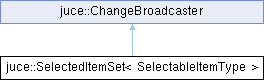
class juce::SelectedItemSet< SelectableItemType >
Manages a list of selectable items.
Use one of these to keep a track of things that the user has highlighted, like icons or things in a list.
The class is templated so that you can use it to hold either a set of pointers to objects, or a set of ID numbers or handles, for cases where each item may not always have a corresponding object.
To be informed when items are selected/deselected, register a ChangeListener with this object.
@tags{GUI}
Member Typedef Documentation
◆ ItemArray
| using juce::SelectedItemSet< SelectableItemType >::ItemArray = Array<SelectableItemType> |
◆ ItemType
| using juce::SelectedItemSet< SelectableItemType >::ItemType = SelectableItemType |
◆ ParameterType
| using juce::SelectedItemSet< SelectableItemType >::ParameterType = typename TypeHelpers::ParameterType<SelectableItemType>::type |
Constructor & Destructor Documentation
◆ SelectedItemSet() [1/3]
|
default |
Creates an empty set.
◆ SelectedItemSet() [2/3]
|
inlineexplicit |
Creates a set based on an array of items.
◆ SelectedItemSet() [3/3]
|
inline |
Creates a copy of another set.
Member Function Documentation
◆ addToSelection()
|
inline |
Selects an item. If the item is already selected, no change notification will be sent out.
- See also
- selectOnly, addToSelectionBasedOnModifiers
◆ addToSelectionBasedOnModifiers()
|
inline |
Selects or deselects an item.
This will use the modifier keys to decide whether to deselect other items first.
So if the shift key is held down, the item will be added without deselecting anything (same as calling addToSelection() )
If no modifiers are down, the current selection will be cleared first (same as calling selectOnly() )
If the ctrl (or command on the Mac) key is held down, the item will be toggled - so it'll be added to the set unless it's already there, in which case it'll be deselected.
If the items that you're selecting can also be dragged, you may need to use the addToSelectionOnMouseDown() and addToSelectionOnMouseUp() calls to handle the subtleties of this kind of usage.
- See also
- selectOnly, addToSelection, addToSelectionOnMouseDown, addToSelectionOnMouseUp
◆ addToSelectionOnMouseDown()
|
inline |
Selects or deselects items that can also be dragged, based on a mouse-down event.
If you call addToSelectionOnMouseDown() at the start of your mouseDown event, and then call addToSelectionOnMouseUp() at the end of your mouseUp event, this makes it easy to handle multiple-selection of sets of objects that can also be dragged.
For example, if you have several items already selected, and you click on one of them (without dragging), then you'd expect this to deselect the other, and just select the item you clicked on. But if you had clicked on this item and dragged it, you'd have expected them all to stay selected.
When you call this method, you'll need to store the boolean result, because the addToSelectionOnMouseUp() method will need to be know this value.
- See also
- addToSelectionOnMouseUp, addToSelectionBasedOnModifiers
◆ addToSelectionOnMouseUp()
|
inline |
Selects or deselects items that can also be dragged, based on a mouse-up event.
Call this during a mouseUp callback, when you have previously called the addToSelectionOnMouseDown() method during your mouseDown event.
See addToSelectionOnMouseDown() for more info
- Parameters
-
item the item to select (or deselect) modifiers the modifiers from the mouse-up event wasItemDragged true if your item was dragged during the mouse click resultOfMouseDownSelectMethod this is the boolean return value that came back from the addToSelectionOnMouseDown() call that you should have made during the matching mouseDown event
◆ begin() [1/2]
|
inlinenoexcept |
◆ begin() [2/2]
|
inlinenoexcept |
Provides iterator access to the array of items.
◆ changed() [1/2]
|
inline |
Used internally, but can be called to force a change message to be sent to the ChangeListeners.
◆ changed() [2/2]
|
inline |
Used internally, but can be called to force a change message to be sent to the ChangeListeners.
◆ deselect()
|
inline |
Deselects an item.
◆ deselectAll()
|
inline |
Deselects all items.
◆ end() [1/2]
|
inlinenoexcept |
Provides iterator access to the array of items.
◆ end() [2/2]
|
inlinenoexcept |
Provides iterator access to the array of items.
◆ getItemArray()
|
inlinenoexcept |
Provides access to the array of items.
◆ getNumSelected()
|
inlinenoexcept |
Returns the number of currently selected items.
- See also
- getSelectedItem
◆ getSelectedItem()
|
inline |
Returns one of the currently selected items. If the index is out-of-range, this returns a default-constructed SelectableItemType.
- See also
- getNumSelected
◆ isSelected()
|
inlinenoexcept |
True if this item is currently selected.
◆ itemDeselected()
|
inlinevirtual |
Can be overridden to do special handling when an item is deselected.
For example, if the item is an object, you might want to call it and tell it that it's being deselected.
◆ itemSelected()
|
inlinevirtual |
Can be overridden to do special handling when an item is selected.
For example, if the item is an object, you might want to call it and tell it that it's being selected.
◆ operator=()
|
inline |
Creates a copy of another set.
◆ selectOnly()
|
inline |
Clears any other currently selected items, and selects this item.
If this item is already the only thing selected, no change notification will be sent out.
- See also
- addToSelection, addToSelectionBasedOnModifiers
Member Data Documentation
◆ selectedItems
|
private |
The documentation for this class was generated from the following file:
- /home/runner/work/lmms-fork/lmms-fork/plugins/CarlaBase/carla/source/modules/juce_gui_basics/mouse/juce_SelectedItemSet.h
Generated on for LMMS by
 1.16.1