#include <juce_ContentSharer.h>
Public Member Functions | |
| void | shareFiles (const Array< URL > &files, std::function< void(bool, const String &)> callback) |
| void | shareText (const String &text, std::function< void(bool, const String &)> callback) |
| void | shareImages (const Array< Image > &images, std::function< void(bool, const String &)> callback, ImageFileFormat *imageFileFormatToUse=nullptr) |
| void | shareData (const MemoryBlock &mb, std::function< void(bool, const String &)> callback) |
Private Member Functions | |
| ContentSharer () | |
| ~ContentSharer () | |
| void | deleteTemporaryFiles () |
| void | sharingFinished (bool, const String &) |
Private Attributes | |
| Array< File > | temporaryFiles |
| std::function< void(bool, String)> | callback |
Additional Inherited Members | |
| Static Public Member Functions inherited from juce::DeletedAtShutdown | |
| static void | deleteAll () |
| Protected Member Functions inherited from juce::DeletedAtShutdown | |
| DeletedAtShutdown () | |
| virtual | ~DeletedAtShutdown () |
Detailed Description
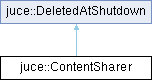
A singleton class responsible for sharing content between apps and devices.
You can share text, images, files or an arbitrary data block.
@tags{GUI}
Constructor & Destructor Documentation
◆ ContentSharer()
|
private |
◆ ~ContentSharer()
|
private |
Member Function Documentation
◆ deleteTemporaryFiles()
|
private |
◆ shareData()
| void juce::ContentSharer::shareData | ( | const MemoryBlock & | mb, |
| std::function< void(bool, const String &)> | callback ) |
A convenience function to share arbitrary data. The data will be written to a temporary file and then that file will be shared. If you have your data stored on disk already, call shareFiles() instead.
Upon completion you will receive a callback with a sharing result. Note: Sadly on Android the returned success flag may be wrong as there is no standard way the sharing targets report if the sharing operation succeeded. Also, the optional error message is always empty on Android.
◆ shareFiles()
| void juce::ContentSharer::shareFiles | ( | const Array< URL > & | files, |
| std::function< void(bool, const String &)> | callback ) |
Shares the given files. Each URL should be either a full file path or it should point to a resource within the application bundle. For resources on iOS it should be something like "content/image.png" if you want to specify a file from application bundle located in "content" directory. On Android you should specify only a filename, without an extension.
Upon completion you will receive a callback with a sharing result. Note: Sadly on Android the returned success flag may be wrong as there is no standard way the sharing targets report if the sharing operation succeeded. Also, the optional error message is always empty on Android.
◆ shareImages()
| void juce::ContentSharer::shareImages | ( | const Array< Image > & | images, |
| std::function< void(bool, const String &)> | callback, | ||
| ImageFileFormat * | imageFileFormatToUse = nullptr ) |
A convenience function to share an image. This is useful when you have images loaded in memory. The images will be written to temporary files first, so if you have the images in question stored on disk already call shareFiles() instead. By default, images will be saved to PNG files, but you can supply a custom ImageFileFormat to override this. The custom file format will be owned and deleted by the sharer. e.g.
Upon completion you will receive a callback with a sharing result. Note: Sadly on Android the returned success flag may be wrong as there is no standard way the sharing targets report if the sharing operation succeeded. Also, the optional error message is always empty on Android.
◆ shareText()
| void juce::ContentSharer::shareText | ( | const String & | text, |
| std::function< void(bool, const String &)> | callback ) |
Shares the given text.
Upon completion you will receive a callback with a sharing result. Note: Sadly on Android the returned success flag may be wrong as there is no standard way the sharing targets report if the sharing operation succeeded. Also, the optional error message is always empty on Android.
◆ sharingFinished()
|
private |
Member Data Documentation
◆ callback
◆ temporaryFiles
The documentation for this class was generated from the following files:
- /home/runner/work/lmms-fork/lmms-fork/plugins/CarlaBase/carla/source/modules/juce_gui_basics/filebrowser/juce_ContentSharer.h
- /home/runner/work/lmms-fork/lmms-fork/plugins/CarlaBase/carla/source/modules/juce_gui_basics/filebrowser/juce_ContentSharer.cpp
Generated on for LMMS by
 1.16.1